Misinformation - GOV.KY


Is It Offical?

Suspicious messages, websites, social-media accounts and payment requests can appear convincing. They may use Government names, logos, images or information to create a false sense of trust or urgency.
You do not need to determine exactly how something was created. If a message or request appears suspicious, take three simple steps:
1
Pause
Do not click a link, make a payment, provide information, respond or forward the message until you have checked it.
2
Check independently
Find the organisation through GOV.KY, a confirmed official account or contact details obtained separately from a trusted source.
Do not use the link, telephone number, email address or website provided in the suspicious message to verify it.
3
Use and share the verified information
Follow the information provided by the confirmed official source. If an unverified claim is circulating, share the verified update rather than forwarding the original content.
Misinformation<br /> in the Cayman Islands
What is Misleading Information?
Misleading information is content that causes someone to believe something that is not true. This can come in many forms, including advertisements, social media posts, videos, news articles, emails or even a WhatsApp message.
Misleading information isn’t just confusing—it erodes trust and can be dangerous.
Official Misinformation Alerts
The Cayman Islands Government (CIG) is aware of a number of misleading messages, scams, and sources of false news circulating online.Read more about these on our Official Government Misinformation Alerts Page.
How To Report A Scam
If you see an ad or post on Facebook that looks suspicious, take a minute to report it. Your action helps remove harmful content and keeps the platform safer.

Why Does Fake News Spread?
We sometimes hear misleading information called 'fake news' in the media. Fake news thrives online because social media platforms reward engagement—whether the content is true or not. The more viral something is, the more it spreads, even if it's misleading.
There are seven common forms of misinformation.
- Satire or parody (misunderstood as real)
- Misleading headlines
- Imposter content (fake accounts pretending to be trusted sources)
- Fabricated content (completely false information)
- False connections (clickbait headlines that misrepresent the content)
- False context (real content shared in a misleading way)
- Manipulated content (photos or videos altered to mislead)
How Fake News Influences Perception
False or fake news has a powerful impact on public perception, particularly during elections and crises, when emotions are high, and people seek quick answers. Here’s how it can impact people:
Shaping Voter Decisions: Misinformation during elections can reinforce biases or sway undecided voters.
Increases Distrust: False news thrives on controversy. Social media algorithms push sensational content, creating "echo chambers" where people only see information confirming their beliefs, causing them to distrust results.
Misleads the Public in Crises: During crises—such as natural disasters, health emergencies, or conflicts—false news spreads rapidly, often worsening the situation.
Undermines Trust in Experts: False news often targets scientists, journalists, and government officials, painting them as untrustworthy.

How To Talk To Friends And Family About Fake News
Information spreads fast, and misinformation can move just as quickly. While you might know the telltale signs regarding fake news, it can be hard to protect our family and friends.
AI Deepfakes & Fake news
AI deepfakes blur reality—learn how to spot fake videos, images, and voices before they fool you.
Official Government Misinformation Alerts
The Cayman Islands Government (CIG) is aware of a number of misleading messages, scams, and sources of false news circulating online.Read more about these on our Official Government Misinformation Alerts Page.
Official Sources of Government Information
In the Cayman Islands, verified government updates come only from official sources.
The Cayman Islands Government Official accounts include:
This is false, incomplete or inaccurate content often shared by people who might not realise it is incorrect or misleading.
Example: Your uncle doesn't mean to cause issues when he shares a post about the earth being flat, but that doesn't make it accurate.
Inaccurate information that is intentionally spread, often to gain influence or manipulate people.
Example:During the 2016 US election on platform X, 3841 accounts linked to the Internet Research Agency (formerly called 'Russian troll farm') posted inaccurate information.
Information based on truth (though it may be exaggerated) but used to cause harm to another group, organisation or person.
Example:When large troves of information are leaked to coincide with a public decision, the party who leaked them may seek to discredit an organisation or person.
How to Tell if Something Is True or False
It's important to look critically at content before sharing it with others to avoid spreading misinformation. There are some questions you can ask yourself when looking at content. These are:
Where to find official Government information
GOV.KY is the central online source for information from Cayman Islands Government ministries, portfolios and departments.
On GOV.KY, you can:
- Find information about Government services;
- Access trusted information about life in the Cayman Islands; and
- Read official Government news and announcements
Individual ministries, portfolios and departments may also publish information through their confirmed websites, social-media accounts and other official channels.
Who is the Source?
- Who wrote, paid for or sponsored to content you are looking at?
- Is the creator an expert in the field or just someone relaying their personal experience?
- Is it a company or a person? Are they making money from views?
- Do they have any credentials that show they've studied the topic or have worked in the field?
What's the Purpose?
- Now that I have the information,what do they want me to do with the information?
- Is the purpose to sell,persuade,entertain or inform? Is the purpose of this content to enrage me?
- Does it seem objective and impartial? Does it acknowledge conflicting information or opposing viewpoints?
- Are there words and images present that seem designed to appeal to your emotions?
How Can You Verify It?
- Cross-check with multiple reliable sources.
- Look for fact-checking from sources like Snopes or other trusted sites.
- Be sceptical of anonymous sources or unverifiable claims.
- Read beyond the headline—clickbait can be misleading.
- Compare perspectives from different political leanings.
- Don’t automatically assume information you receive is correct. Even if it comes from family or friends.
- Look for out of place design elements or incorrect branding
Red Flags to Watch For
- No verification badge on social media profiles
- Misspelled URLs or fake website links
- Emotionally charged language designed to trigger outrage
- Sensationalist or exaggerated claims
Check before you click, pay or share
Official Sources of Information from the Cayman Islands Government
If you are not sure if the source is legitimately Government or not, there are several ways you can check:
Check if web links redirect you to the official government website. Be cautious of misspellings or unusual URLS.
Check if the social media account has a verification badge. How long has it been active? Government official channels have been active for years and will not have been created recently.
Does the content match information from trusted sources?
Note: Government official social media accounts will never directly message you asking for personal data or information.

Public Urged to Remain Vigilant as Fake SMS and Google Meet Scams Continue
The Cyber Security Office is urging the public to remain vigilant as scammers continue to impersonate Cayman Islands Government entities through fraudulent SMS messages, Google Meet calls and fake government websites designed to steal personal and financial information
Public Advisory: Police Warn of Fraudulent Traffic Fine Text Messages
Anyone who has clicked the link and made a payment should contact their financial institution immediately and contact 9-1-1 immediately to make a report to the police
Be cautious when a message unexpectedly asks you to:
- Click a link or download a file;
- Make a payment or transfer money;
- Provide a password, verification code or banking information;
- Share personal or account information;
- Respond immediately to avoid a penalty or loss of service; or
- Forward information to other people.
Before taking action:
- Go to GOV.KY or the organisation’s official website independently;
- Use contact details obtained separately from the message;
- Check whether an alert or verified update has been issued;
- Contact the relevant Government entity directly if you remain uncertain; and
- Wait until the request has been verified before acting or sharing it.
- A familiar logo, professional design, recognised name, realistic voice or apparent social-media verification does not prove that a message or account is genuine.
Official Government sources
The Cayman Islands Government central channels include:
- GOV.KY
- Government news and announcements
- X
- YouTube
- Radio Cayman at 89.9-92.9 FM
- Government WhatsApp Channel
- Official Government Newsletter
Government ministries, portfolios and departments may operate additional official channels. Use GOV.KY to locate the relevant organisation and confirm its contact information.
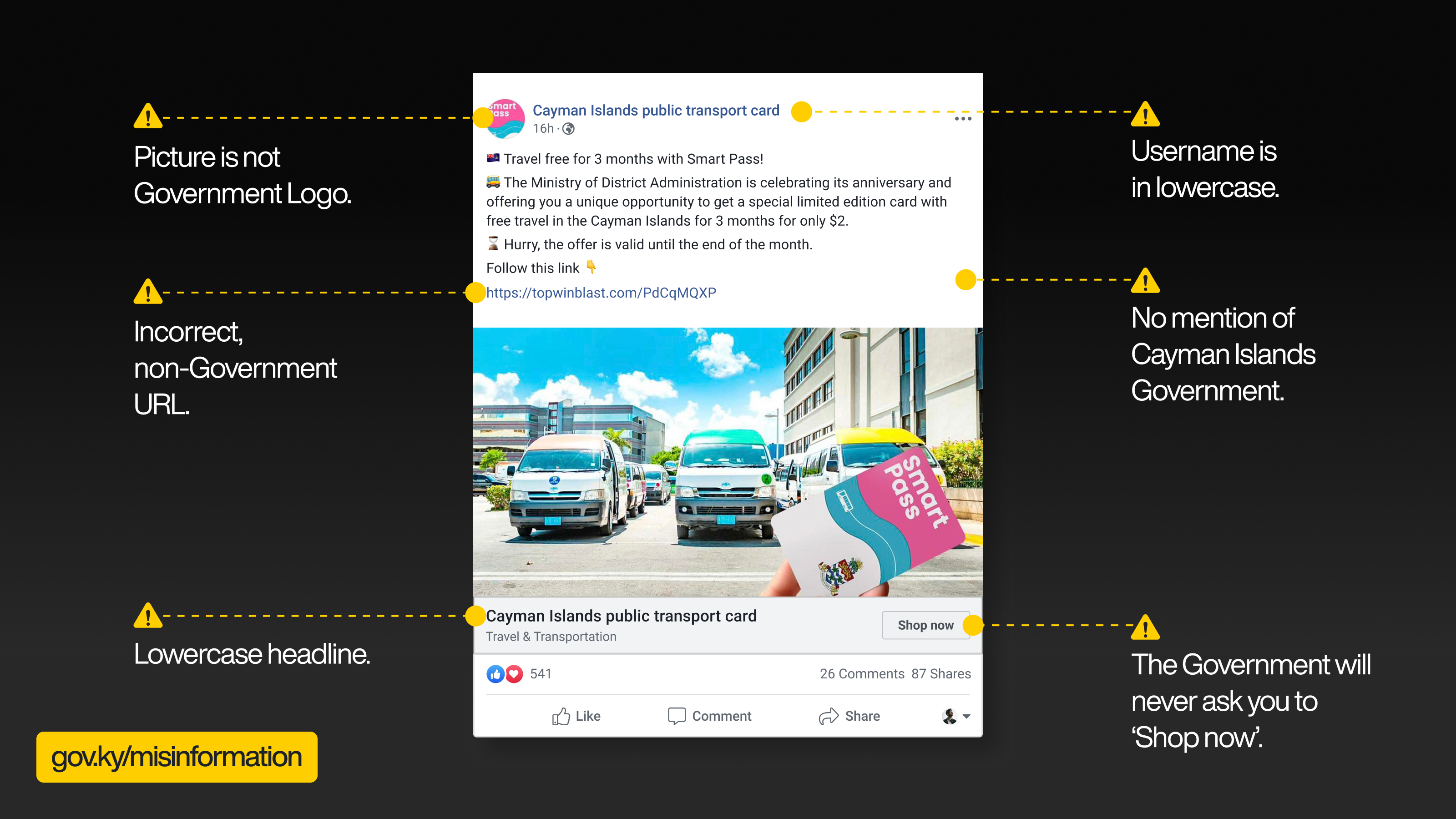
How to Spot a Fake Social Media Post
To check whether a social post is legitimately Government or not, take a look at some key giveaways from a false post (below):
If the picture is not the Government logo or crest, it is likely not the Government.
If the post uses an incorrect and non-government URL, check before you click.
If the username of the page or account is in lowercase, it is likely not Government.
The use of lowercase headlines means the post is likely not a Government one.
The Government will never ask you to 'Shop now' on a social media post.
If a post does not mention the Cayman Islands Government, on top of all the above, treat it with scepticism.
What to do if something appears suspicious
Do not interact further with the message or account while you check it.
- Social-media content or advertisements: Use the platform’s reporting feature.
- A message claiming to come from Government: Contact the relevant Government entity using details obtained independently through GOV.KY.
- A suspected scam or crime: Preserve the message, screenshots, payment records and other relevant information, and follow the confirmed RCIPS reporting process.
- A suspicious payment or disclosed banking information: Contact your bank or financial institution immediately using the number on its official website or your bank card.
- A compromised account: Change the password, enable multi-factor authentication and use the platform’s official account-recovery process.
If you have already clicked, paid or provided information, act quickly. Anyone can be affected by a convincing scam, and seeking help promptly may reduce the harm.
Reports of misinformation should be made to RCIPS by visiting your nearest Police Station to file a report or calling 911.
How to Spot an Engagement Trap
Engagement traps are designed to exploit human psychology,keeping users hooked while often spreading misinformation,low-value content,or emotional outrage.Enraging people on social (also known as ‘rage baiting’) is a common engagement trap.
Here is what to look for to avoid them:
Emotionally Charged Content:Designed to evoke extreme anger, fear, or excitement—these posts provoke a reaction but do not inform. The best way to check for this is to ask yourself: Does the content make you feel an intense urge to react?
Clickbait Headlines:These are headlines with over-the-top claims like “You won’t believe what happened next!” They can often be exaggerated or misleading.
Rage Baiting:This commonly is seen in content that paints an “us vs. them” narrative or demonises a group.
Sensationalised Claims:You can see this in posts that have headlines like “Scientists HATE this trick!” or “This one secret will change everything.” An easy way to filter these out is to check whether other credible sources can verify the information.
Misleading Visuals:Images or videos taken out of context to support a false narrative. An easy way to check for these is to reverse image search or fact-check with reliable sources.
We can protect ourselves from engagement traps online by engaging critically, not impulsively, and being mindful of emotional responses.
Learn more
Cyber Safe provides practical information to help you protect yourself, your information, your money and your family online.
What are Deepfakes?
Images, video, audio or content that appears to have been edited to show unrelated events or information can spread spread false narratives.
AI-generated synthetic media that convincingly mimics real people, often making them appear to say or do things they never actually did, are called Deepfakes. While deepfakes have legitimate uses in entertainment and education, they also pose ethical and security risks.
Look out for unnatural lighting or blurry facial features. Also, look for strange blinking patterns or lip-syncing issues in videos. In today’s media, seeing is no longer believing.
How to Verify a Government Social Media Post or Account
Social media can be particularly hard to verify. In general, look out for:
- Lack of verification badges
- Incorrect spelling in usernames, account handles or posts
- Profile names and URLs not matching
- Missing or incorrect profile pictures
- Lack of links to official Government websites
- Lack of Cayman Islands Government branding (for example, no CIG crest)
Help to Share the Truth
Sharing false information—knowingly or unknowingly—only fuels confusion. If a claim seems suspicious, take a moment to verify before hitting share. Misinformation thrives on engagement, but truth matters more.

